How much does refresh rate really matter ?
Understand the difference between 60Hz, 90Hz and 120Hz displays, how refresh rate affects gaming and everyday use, and when a higher refresh rate is worth paying for.
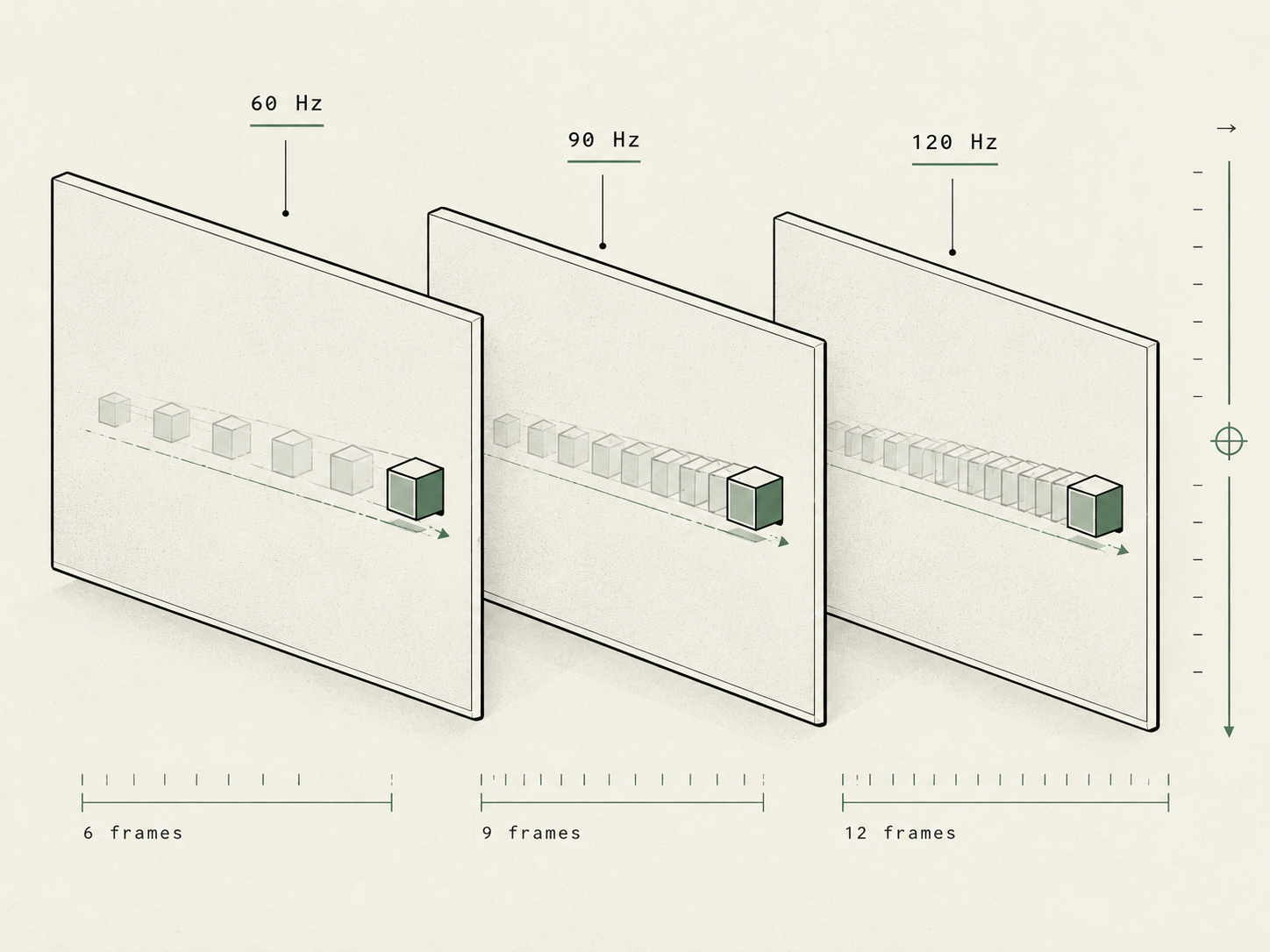
Understand the difference between 60Hz, 90Hz and 120Hz displays, how refresh rate affects gaming and everyday use, and when a higher refresh rate is worth paying for.
What is refresh rate?
Refresh rate is the number of times a display updates its image every second. It is measured in hertz (Hz).
A 60Hz display refreshes 60 times per second. A 120Hz display can refresh 120 times per second. At 120Hz, the screen has the opportunity to present a new image twice as often as a 60Hz display.
That sounds like a simple numbers game, but the practical difference is easier to understand when you start using the device.
60Hz vs 120Hz: what changes?
Imagine scrolling through a long article on your phone. On a 60Hz screen, the movement is updated at a lower frequency. On a 120Hz screen, the display can show more intermediate updates, making the scrolling appear smoother when the software and content support it.
The difference can also be noticeable when switching between apps, moving windows around a laptop, or navigating menus. Animations tend to look more fluid, and supported stylus input can feel more natural.
Here is how common refresh rates compare:
- 60Hz: Still perfectly usable for browsing, messaging, reading, and everyday work.
- 90Hz: A useful middle ground that can make scrolling and animations feel smoother than 60Hz.
- 120Hz: A noticeable step up for many people, particularly when scrolling, gaming, or using a responsive interface.
- 144Hz and above: Especially appealing to PC gamers who play fast-paced games and have hardware capable of producing high frame rates.
These are not strict quality rankings. A well-tuned 60Hz screen can still offer better colour, contrast, brightness, and readability than a poorly made high-refresh-rate display.
Refresh rate is not the same as frame rate
This is where the numbers can become misleading.
Refresh rate describes how often a display can update. Frame rate, usually measured in frames per second (fps), describes how many frames a device or game produces in a second.
A 120Hz display does not automatically mean that every game runs at 120fps. The processor, graphics hardware, software, and game itself all affect how many frames are generated.
For example, a game running at 60fps on a 120Hz display does not suddenly become a native 120fps experience. The display has a higher refresh-rate capability, but the game is still producing 60 frames per second.
The same principle applies to video. Watching a video recorded at a lower frame rate does not automatically turn it into genuinely higher-frame-rate footage simply because your screen supports 120Hz.
The important distinction: a high refresh rate gives the display more opportunities to show updates. It cannot create performance that the rest of the system does not deliver.
Does refresh rate matter for gaming?
For gaming, refresh rate can make a real difference.
In fast-paced titles, a higher refresh rate can make movement easier to follow and controls feel more responsive. It is particularly useful in competitive shooters, racing games, and other titles where quick reactions matter.
However, the benefit depends on the frame rate the system can sustain. Pairing a 144Hz monitor with a computer that consistently struggles to produce smooth frame rates will not deliver the full experience the monitor is capable of.
Variable refresh rate technologies can also help. On supported devices, technologies such as NVIDIA G-SYNC and other compatible adaptive-sync implementations adjust the display’s refresh timing to better match the frames being produced. This can reduce visible tearing and improve the overall experience in supported setups.
For casual games, strategy titles, or games with slower movement, the difference may be less important than other display features.
What about phones and laptops?
A high refresh rate is not just for gamers.
On a phone, the most obvious benefit is often everyday navigation. Scrolling feeds, browsing websites, opening menus, and moving between screens can feel smoother. Once you become accustomed to a higher refresh rate, returning to 60Hz may feel less fluid.
On a laptop, a higher refresh rate can improve scrolling, window movement, and supported pen interactions. It can be valuable for gaming laptops, but it can also improve the everyday experience of using a premium notebook.
Still, a laptop with a sharp, bright, colour-accurate 60Hz display may be a better choice for photo editing, office work, or general use than a laptop with a weaker 120Hz panel.
Your screen’s resolution, colour accuracy, brightness, contrast, viewing angles, and response time all matter too.
The trade-off: battery life
There is one practical downside to consider: power consumption.
A higher refresh rate can use more energy, although the exact impact depends on the panel, device design, brightness, software, and what is on screen. On a phone or laptop, that can mean shorter battery life when a high refresh rate is used continuously.
Some devices use adaptive or variable refresh rate features. These can lower the refresh rate during less demanding tasks and increase it when smoother motion is useful. Where available and properly implemented, this helps balance responsiveness with power efficiency.
If battery life is a priority, a fixed lower refresh rate may be worth considering. If your device supports an adaptive mode, that can be a sensible first option.
Should you pay extra for 120Hz?
That depends on your priorities.
Choose a higher refresh rate when smooth scrolling, fluid animations, competitive gaming, or responsive stylus use are important to you. It is particularly worthwhile when you can experience the difference directly and the price premium is reasonable.
A 60Hz display is still a sensible choice for reading, emails, document editing, streaming, and everyday tasks. You do not need 120Hz to have a good smartphone or laptop experience.
When comparing two devices, look beyond the refresh-rate number. A brighter display, better contrast, accurate colours, stronger performance, or longer battery life may deliver more value than a higher refresh rate alone.
The verdict
Refresh rate matters, but it is not the whole story.
Moving from 60Hz to 120Hz can make supported interfaces and games feel noticeably smoother. Higher rates can offer further benefits in particular gaming scenarios, but the returns depend on the hardware and the content.
The smartest purchase is not automatically the screen with the largest number printed on the specifications sheet. It is the one whose overall display quality and performance match how you actually use your device.
The Bench takeaway: treat refresh rate as an important specification, not a shortcut to judging the entire display.
Further reading
Microsoft Support: Change the refresh rate on your monitor in Windows